Any do
Category :Photo Enhancement
Size :81.98MB
Versions:v5.23.1.0
Published:11 23, 2026
Package ID: com.anydo
Developer: Any.do To-do list & Calendar.
Votes
9.2
Any.do stands out as an efficient Android application designed for users seeking to streamline their daily lives through organized planning and task management. It offers a comprehensive suite of tools that cater to organizing, scheduling, and tracking essential tasks and events. Android users may find Any.do particularly compelling for its ability to seamlessly integrate calendars, to-do lists, and reminders, positioning it as a practical solution for personal productivity enhancement.
Comprehensive Task Management
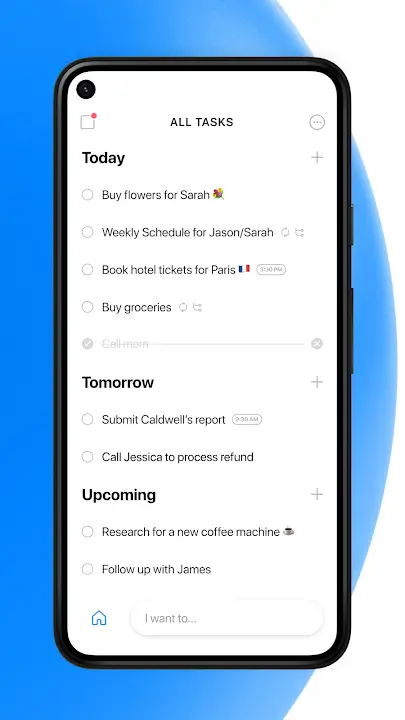
Any.do's task management capabilities are at the core of its appeal. Users can easily create tasks, set varied reminders, and maintain organized to-do lists. The application supports once-only, recurring, and location-based reminders, ensuring tasks are completed promptly. Furthermore, users can import tasks from their device's clipboard, enhancing flexibility and efficiency.
Intuitive User Interface and Experience
With its user-friendly design, Any.do simplifies the management of activities and events through intuitive touch controls and gesture operations. Features like the shake function for executing specific actions highlight the app's innovative approach to enhancing usability. Android users benefit from a streamlined, aesthetically pleasing experience that improves overall interaction with the application.
Integration and Synchronization
Any.do excels in integrating various applications and services, consolidating plans and lists into a unified calendar view. The seamless synchronization between multiple devices ensures that users can access their schedules, to-do lists, and reminders anywhere, anytime. This cross-device capability makes transitioning between platforms smooth and efficient.
Practical Applications for Daily Life
By offering features like detailed shopping list creation and sharing, Any.do aids users in managing household tasks and coordinating with family members efficiently. Its robust functionality supports project strategy formulation, task distribution among team members, and personal scheduling, making it a flexible tool for both professional and personal use.
Enhanced Productivity Tools
The application provides advanced productivity tools like an interactive calendar, inbox, notepad, and customizable boards, allowing users to fine-tune their daily organization strategy. By offering both basic and advanced options, Any.do enables users to tailor their experience according to specific needs, ultimately boosting productivity and time management.
Conclusion: Boost Your Productivity
In summary, Any.do is a powerful Android application designed to enhance productivity through comprehensive planning and task management. Its user-friendly interface, seamless integration with other apps, and robust scheduling capabilities make it an ideal choice for individuals aiming to optimize their daily routines and improve efficiency. Interested users are encouraged to explore Any.do for an enriched organizational experience through the convenient Android download options available.
Screenshots


Hot Topics
Explore More

Photo Mate R3
Size:129.96MB
Photo Enhancement
Stay Focused
Size:14.06MB
Photo Enhancement

GIF Maker
Size:40.84MB
Photo Enhancement

Face Me
Size:75.94MB
Photo Enhancement

Photomyne
Size:215.49MB
Photo Enhancement

Gradient
Size:189.17MB
Photo Enhancement

AI Mirror
Size:206.92MB
Photo Enhancement

PortraitAI
Size:4.36MB
Photo Enhancement

MiX Camera
Size:66.01MB
Photo Enhancement

XDV
Size:32.48MB
Photo Enhancement

UpNote
Size:22.69MB
Photo Enhancement

SnapEdit
Size:109.07MB
Photo Enhancement
Latest News
Stardew Valley 1.7 Update Could Be Its Biggest Release Yet in 2027
10 28, 2026Nintendo Reveals Why Ocarina of Time Remake Has a Puppet-Like Style
10 28, 2026id Software and MachineGames Strengthen Collaboration Amid Staff Cuts
10 28, 2026Phantom Blade Zero Hits 830K Concurrent Steam Players in First Week
10 24, 2026