
Pic Collage - Photo Frame
Category :Theme Wallpapers
Size :12.46MB
Versions:v1.4.8
Published:11 13, 2026
Package ID: com.collagemaker.photoeditor.photolayout
Developer: Attractive Apps Valley
Votes
8.5
Pic Collage - Photo Frame is a creative Android application designed for photo enthusiasts eager to turn collections of images into stunning and personalized collages. With its user-friendly interface, the app empowers users to create photo collages for various occasions, employing an array of templates, editing tools, and design elements. Whether you're crafting a memorable keepsake of a special event or a vivid travel album, Pic Collage - Photo Frame provides a versatile platform for transforming your digital snapshots into artistic expressions. Users can expect a blend of creative freedom and practical functionality in this intuitive app.
Transform Your Photos with Customizable Layouts
At the core of Pic Collage - Photo Frame's functionality is its ability to organize up to 50 photos into a single collage. Users can select from pre-set grid layouts for automatic photo arrangement or opt for the freeform mode to position images individually. This flexibility makes it easy to achieve both structured and artistic compositions, catering to diverse styling preferences and project types.
Enhance Creativity with Thematic Templates and Tools
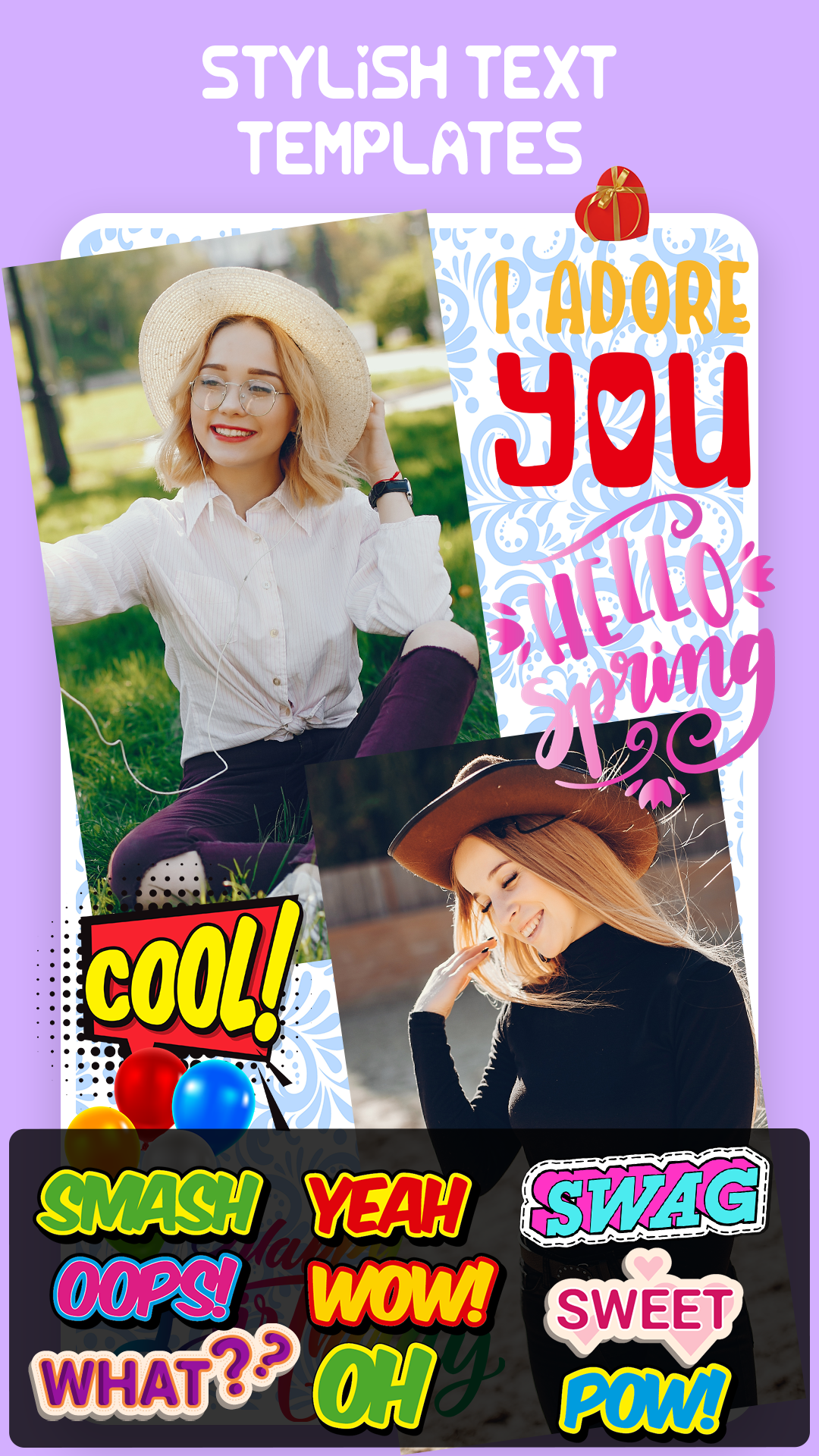
Pic Collage - Photo Frame offers a rich array of thematic templates and decorative frames tailored to popular events like birthdays, Christmas, and anniversaries. Users also benefit from tools such as filters to alter image aesthetics, text and stickers for personalized touches, and decorative borders to refine each creation's appearance. These features enable users to infuse their collages with emotion and creativity, reflecting on the unique stories behind their photos.
Intuitive Editing and Sharing Made Easy
The application's straightforward workflow simplifies the collage-making process. Users begin by selecting images from their device's gallery, then choose a layout and customize the collage using various tools. Pic Collage - Photo Frame includes basic photo-editing options like cropping, resizing, and rotating, facilitating precise adjustments. Once satisfied with their design, users can save the collage in high definition or share it via supported platforms, making it simple to distribute their visual stories.
Why Pic Collage - Photo Frame Stands Out
Pic Collage - Photo Frame distinguishes itself by combining an intuitive editing workspace with extensive customization features. The app supports up to 50 photos in a single collage, eliminating the need to create multiple designs for larger collections. Its dual layout modes accommodate a range of creative needs from orderly to freeform. Moreover, it provides high-definition export and built-in sharing options, facilitating effortless distribution and showcasing of finished works.
Create Lasting Memories with Pic Collage - Photo Frame
In summary, Pic Collage - Photo Frame is an ideal choice for Android users seeking a flexible and creative outlet for photo display. By integrating easy-to-use editing tools with extensive customization options, it enables users to craft meaningful and visually appealing collages that commemorate important life events. With its seamless blend of function and creativity, Pic Collage - Photo Frame invites users to explore its download options and enhance their photo-collage making experience.
Screenshots




Hot Topics
Explore More

Facemoji Keyboard
Size:57.92MB
Theme Wallpapers
Video Live Wallpaper
Size:16.39MB
Theme Wallpapers

Sticker Maker
Size:20.04MB
Theme Wallpapers

Halloween Girl Costume
Size:107.04MB
Theme Wallpapers

NotifyBuddy
Size:8.8MB
Theme Wallpapers
Keys Cafe
Size:41.88MB
Theme Wallpapers

Spheroid
Size:128.32MB
Theme Wallpapers

One S Launcher
Size:25.5MB
Theme Wallpapers

Wallfever
Size:7.31MB
Theme Wallpapers
Alpha Prime
Size:12.67MB
Theme Wallpapers
Launcher OS
Size:130.01MB
Theme Wallpapers

TeamPixel
Size:12.59MB
Theme Wallpapers
Latest News
Stardew Valley 1.7 Update Could Be Its Biggest Release Yet in 2027
10 28, 2026Nintendo Reveals Why Ocarina of Time Remake Has a Puppet-Like Style
10 28, 2026id Software and MachineGames Strengthen Collaboration Amid Staff Cuts
10 28, 2026Phantom Blade Zero Hits 830K Concurrent Steam Players in First Week
10 24, 2026